

Actualizaciones Software
- Autor 636R
- Fecha de inicio
-
- Etiquetas
- alfa romeo giulia
Estás usando un navegador obsoleto. No se pueden mostrar este u otros sitios web correctamente.
Se debe actualizar o usar un navegador alternativo.
Se debe actualizar o usar un navegador alternativo.




㈜ 가비아 서비스 만기 안내
도메인등록, 도메인이전, 도메인연장, 도메인무료부가서비스 제공, 웹호스팅, 쇼핑몰호스팅, 동영상호스팅, 단독서버호스팅, 웹메일호스팅 등 저렴한 호스팅 가격 제공. 홈페이지제작, 기업홍보, 쇼핑몰, IR, e-Biz, 공공기관 홈페이지구축 및 컨설팅, 웹솔루션, 홈페이지 유지보수등 홈페이지제작 전문 업체
www.kaptrader.com
este es el de mi video y el que has puesto...
Enviado desde mi SM-G935F mediante Tapatalk

Veras Lupi, no tengo por costumbre hablar de lo que no conozco o ”compruebo”, pero dado que pareces demostrar un interés que desconozco, aquí mi fuente de información.solo h visto El modelo sin probar a meter datos de vehículo..
es un mirroring standar ..hay muchísimos...
no es compatible con giulia no tenemos entrada Av ni HDMI.
este era el gran problema de nuestro coche ..por eso tiene q ser un modulo specifico,sino Tb podríamos haber montado AA y Carplay del mismo modo....atraves de entrada av
el anterior módulo que monte si que deba una entrada HDMI o Av y hay fue donde conectaba mi cromecast
Enviado desde mi SM-G935F mediante Tapatalk

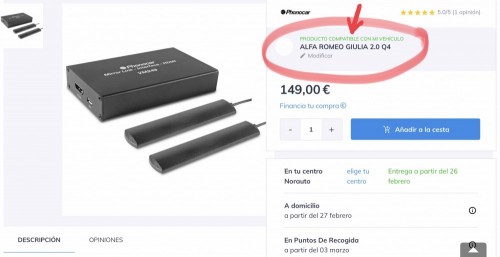
Perdona que no te había entendido este es el que tú has montado en tu vehículo.. no te había pillado he visto los vídeos y donde lo has comprado?
el mío era un modelo mirroring como se ve en el enlace ..ya fuera de fabricación.
ahora ofertan la posibilidad de android auto/ carplay .tanto kaptrader ( la misma empresa que yo puse mirroring)como eng customs( italianos)
el mirroring aunqu podía ver todo el telefono...El contro era peligroso para la conducción y el gasto de batería no veas .
Enviado desde mi SM-G935F mediante Tapatalk
ahora ofertan la posibilidad de android auto/ carplay .tanto kaptrader ( la misma empresa que yo puse mirroring)como eng customs( italianos)
el mirroring aunqu podía ver todo el telefono...El contro era peligroso para la conducción y el gasto de batería no veas .
Enviado desde mi SM-G935F mediante Tapatalk
a veces hay fallos en los buscadores ...pero es cuestion de preguntar directamente...a la empresa...segun las introducciones creo que no es compatible en mi humilde opinión de forero que no profesional.Veras Lupi, no tengo por costumbre hablar de lo que no conozco o ”compruebo”, pero dado que pareces demostrar un interés que desconozco, aquí mi fuente de información.
Enviado desde mi SM-G935F mediante Tapatalk

Hola Alfistas una pregunta, tuve la mala suerte que la pantalla central la infotainment me salió mal y la tuve que cambiar en el taller. Ya no sé si es por la actualización o la pantalla que me han puesto nueva pero no sale el logo de alfa romeo ni al encender contacto ni quitarlo, os pasa a vosatros con la 090? O será cosa de mi pantalla que me han puesto? Recuerdo que antes si me salía.
Última edición:

Me suena que había una opción por ahí para configurarlo.Hola Alfistas una pregunta, tuve la mala suerte que la pantalla central la infotainment me salió mal y la tuve que cambiar en el taller. Ya no sé si es por la actualización o la pantalla que me han puesto nueva pero no sale el logo de alfa romeo ni al encender contacto ni quitarlo, os pasa a vosatros con la 090? O será cosa de mi pantalla que me han puesto? Recuerdo que antes si me salía.
Enviado desde mi MI 5s Plus mediante Tapatalk
Pulsa el botón de volumen, el que hay a la derecha de la rodeta central grande y se encenderá, después entras en ka configuración y lo pones en On, o lo dejas en off y lo enciendes cada vez pulsando el botón.He probado lo de encendido automático lo he puesto en off y ahora no se enciende la pantalla. La he liado, como la enciendo ahora?

Gracias, no sabía como activarla. Y no he encontrado nada para activar lo del logo.
Si te refieres a la pantalla central del infotainment......el logo de AR solo aparece cuando se reinicia el sistema. No es posible hacer que aparezca el logo cada vez que enciendes el sistema infotainment

El logo sale cuando lo tienes en encendido automático, cuando das el contacto. Creo que es así, en el mío así lo hace.
ummmm, lo probaré. Gracias

pongo un extracto del foro usa respecto a las actualizaciones y software
parece que hay una versión última para los modelos antiguos....
As the other thread was getting a bit long, here a condensed version
Remark: Updated version from original, date 14 March 2020
Information on updating maps and software for Giulia/stelvio infotainment system
Note that systems and software are same for giulia and stelvio, so same procedures apply.
There are currently 2 hardware versions of the infotainment hardware, one from approx 2017 and earlier (old system), the other (new) introduced since then (intro new around Nov '17 Europe, July '17 USA). Note: the new 2020 facelift models have a different system, this is not covered here.
The functionality of the 2 systems is the same, but they use different processors and internal circuitry, and so require different firmware.
The new system appears to be about twice as fast as the old system.
Another difference is that new systems can have Apple Carplay/Android Auto, old systems are not capable of this.
Easy way to see which system you have is by looking at the firmware version via the system menu.
The "old" firmware is numbered 001.xxx.xxx, 002.xxx.xxx etc., the "new" system is numbered with higher numbers in front, such as 051.xxx.xxx, 056.xxx.xxx etc.
Starting with 056.xxx.xxx support for AA/ACP was added (though not automatically activated).
The firmware versions cannot be exchanged, so for firmware updates the correct series software for the installed hardware must be used. The system checks for compatibility at update.
Initialy firmware versions were available as download from Alfa for updating, however, at some point Alfa closed this update path. There are however still early versions circulating on the internet. A number of these were collected and are available via the bottom on this posting.
Official update route for firmware is via the dealer, maps via user.
Latest version for the old hardware (in Europe) is currently 002.009.055. Recently 002.010.041 was introduced, unclear if this is also compatible for Europe. For Australia (new Zealand?) there is a 002.009.056 version that solves the voice recognition problem they had (now also 002.009.061?). For Nafta there is a version 002.009.059, which solves reboot issues with satelite receiver. Note both these last versions are not compatible with Europe. There is also a new version 002.010.041.
Early versions such as 001.xxx.xxx were not yet suited for user map updates, and require updating to at least 002.xxx.xxx to enable map updates.
Firmware for new hardware is still continuously evolving (beginning 2020) ....
One of the early versions was 051.xxx.xxx, other versions (examples) 056.000.007, 072.001.002, 081.000.004, 085.000.046, 090.000.061 etc.
Apparently updating past 072.xxx.xxx from earlier versions to later also requires checking if following modules are at sufficient software version, and these might require updating.
* AMP (Amplifier HiFi system)
* BSM (Brake System Module)
* IPC (Instrument Panel Cluseter)
* PAM (Parking Assist Module)
* LBSS/RBSS (Blind Spot Sensors)
* BCM (Body Computer Module)
This needs to be done by dealer as this requires the dealer tool Witech2. See also info file 085 update.pdf in the downloads.
Map updates (in Europe) can be downloaded from the Mopar website, after registering as they require a license file for installation, based on the VIN of the car.
Officialy they are free (at least) the first 3 years after car registration.
Original supplier of the maps is TomTom, new maps come out every 3 months. There is a difference in maps for the 6.5" systems and 8.8" systems, the correct (latest) map for your car should automatically be presented on the Mopar site upon registering with your VIN.
Update procedures:
Firmware
preparation
Format a 16 Gb USB stick as NTFS. Note that MacOS extended, as mentioned as option for map updates, seems to give more problems with firmware updates, so Windows NTFS is recomended for firmware updates.
Download the correct version for the installed infotainment hardware. This is usually zipped.
Unzip the file, this should give a .bin file, a .xml file and possibly a .md5 file.
* place all unzipped files on root of USB stick
* place stick in USB port car. Don't use usb port in rear, as this is power only
* make sure there are no other devices in any of the other USB ports
* start engine and switch off start/stop
* select
* update should start, takes approx 15 minutes. System will reboot once or twice during update
* after completion, remove usb stick
Maps (Europe)
preparation
Format a 16 Gb USB stick as NTFS. On Apple it seems MacOS extended (journaled) also works for maps.
If first time, create an account on Mopar website. Download license file and map file
Location: maps.mopar.eu
This should give 2 files, a .dct file (license) and a .bin file (map)
* place the 2 files on root of USB stick
* place stick in USB port car. Don't use usb port in rear, as this is power only
* make sure there are no other devices in any of the other USB ports
* start engine, switch off start/stop
* select
* update should start, takes approx 70 minutes on "old" hardware, 30 minutes on "new".
Note: the system will tell you it will take much longer, this is incorrect though, the above times are approx correct
Update should be started whilst car is stationary. After update starts to run, car can be driven during update. Do not switch off engine during the update, as this will cancel the update.
- after completion, remove usb stick
===============
Special remarks on early version 001.xxx.xxx firmware
001 was the first version of the infotainment firmware for the "old" system.
This did/does not support user updates of the maps via USB yet, it does however support firmware updates via USB.
To be able to use the option to update maps, and solve a number of bugs, it is recommended to update to the last version 002.009.055 (Europe). Also the navigation was improved with version 002.
This update can be done with the standard procedure above. However, updating from 001.xxx.xxx will delete the existing installed maps and possibly onboard manual. This is not a problem, as after the update to 002.xxx.xxx you can subsequently install the latest maps, and if required, the onboard manual. Just takes a bit more work first time
=============== DOWNLOADS ===============
Unofficial download location 002.009.055:
M86.zip
Unofficial download location 002.010.041:
ETM_SW-002.010.041.zip
Relevant Service News File:
ETM_MV_002.010.041.pdf
Unofficial download location 056.000.007:
A56.zip
Unofficial download location 085.000.046 :
A85.zip
Relevant Service news file:
info file 085 update.pdf
Unofficial download location 090.000.061 :
ETM_SW_A90.zip
Relevant Service news file:
MV_090.000.061.pdf
Unofficial download location onboard manual M72
M72.zip
Note: not sure if the manual will install, as according to enclosed config file it's originally for firmware 002.009.047
===============
info 002.009.055
service bulletin 08-002-18
info 002.010.041:
ETM_MV_002.010.041.pdf
info 002.009.059
service bulletin 08-013-19
Enviado desde mi SM-G935F mediante Tapatalk
parece que hay una versión última para los modelos antiguos....
As the other thread was getting a bit long, here a condensed version

Remark: Updated version from original, date 14 March 2020
Information on updating maps and software for Giulia/stelvio infotainment system
Note that systems and software are same for giulia and stelvio, so same procedures apply.
There are currently 2 hardware versions of the infotainment hardware, one from approx 2017 and earlier (old system), the other (new) introduced since then (intro new around Nov '17 Europe, July '17 USA). Note: the new 2020 facelift models have a different system, this is not covered here.
The functionality of the 2 systems is the same, but they use different processors and internal circuitry, and so require different firmware.
The new system appears to be about twice as fast as the old system.
Another difference is that new systems can have Apple Carplay/Android Auto, old systems are not capable of this.
Easy way to see which system you have is by looking at the firmware version via the system menu.
The "old" firmware is numbered 001.xxx.xxx, 002.xxx.xxx etc., the "new" system is numbered with higher numbers in front, such as 051.xxx.xxx, 056.xxx.xxx etc.
Starting with 056.xxx.xxx support for AA/ACP was added (though not automatically activated).
The firmware versions cannot be exchanged, so for firmware updates the correct series software for the installed hardware must be used. The system checks for compatibility at update.
Initialy firmware versions were available as download from Alfa for updating, however, at some point Alfa closed this update path. There are however still early versions circulating on the internet. A number of these were collected and are available via the bottom on this posting.
Official update route for firmware is via the dealer, maps via user.
Latest version for the old hardware (in Europe) is currently 002.009.055. Recently 002.010.041 was introduced, unclear if this is also compatible for Europe. For Australia (new Zealand?) there is a 002.009.056 version that solves the voice recognition problem they had (now also 002.009.061?). For Nafta there is a version 002.009.059, which solves reboot issues with satelite receiver. Note both these last versions are not compatible with Europe. There is also a new version 002.010.041.
Early versions such as 001.xxx.xxx were not yet suited for user map updates, and require updating to at least 002.xxx.xxx to enable map updates.
Firmware for new hardware is still continuously evolving (beginning 2020) ....
One of the early versions was 051.xxx.xxx, other versions (examples) 056.000.007, 072.001.002, 081.000.004, 085.000.046, 090.000.061 etc.
Apparently updating past 072.xxx.xxx from earlier versions to later also requires checking if following modules are at sufficient software version, and these might require updating.
* AMP (Amplifier HiFi system)
* BSM (Brake System Module)
* IPC (Instrument Panel Cluseter)
* PAM (Parking Assist Module)
* LBSS/RBSS (Blind Spot Sensors)
* BCM (Body Computer Module)
This needs to be done by dealer as this requires the dealer tool Witech2. See also info file 085 update.pdf in the downloads.
Map updates (in Europe) can be downloaded from the Mopar website, after registering as they require a license file for installation, based on the VIN of the car.
Officialy they are free (at least) the first 3 years after car registration.
Original supplier of the maps is TomTom, new maps come out every 3 months. There is a difference in maps for the 6.5" systems and 8.8" systems, the correct (latest) map for your car should automatically be presented on the Mopar site upon registering with your VIN.
Update procedures:
Firmware
preparation
Format a 16 Gb USB stick as NTFS. Note that MacOS extended, as mentioned as option for map updates, seems to give more problems with firmware updates, so Windows NTFS is recomended for firmware updates.
Download the correct version for the installed infotainment hardware. This is usually zipped.
Unzip the file, this should give a .bin file, a .xml file and possibly a .md5 file.
* place all unzipped files on root of USB stick
* place stick in USB port car. Don't use usb port in rear, as this is power only
* make sure there are no other devices in any of the other USB ports
* start engine and switch off start/stop
* select
* update should start, takes approx 15 minutes. System will reboot once or twice during update
* after completion, remove usb stick
Maps (Europe)
preparation
Format a 16 Gb USB stick as NTFS. On Apple it seems MacOS extended (journaled) also works for maps.
If first time, create an account on Mopar website. Download license file and map file
Location: maps.mopar.eu
This should give 2 files, a .dct file (license) and a .bin file (map)
* place the 2 files on root of USB stick
* place stick in USB port car. Don't use usb port in rear, as this is power only
* make sure there are no other devices in any of the other USB ports
* start engine, switch off start/stop
* select
* update should start, takes approx 70 minutes on "old" hardware, 30 minutes on "new".
Note: the system will tell you it will take much longer, this is incorrect though, the above times are approx correct
Update should be started whilst car is stationary. After update starts to run, car can be driven during update. Do not switch off engine during the update, as this will cancel the update.
- after completion, remove usb stick
===============
Special remarks on early version 001.xxx.xxx firmware
001 was the first version of the infotainment firmware for the "old" system.
This did/does not support user updates of the maps via USB yet, it does however support firmware updates via USB.
To be able to use the option to update maps, and solve a number of bugs, it is recommended to update to the last version 002.009.055 (Europe). Also the navigation was improved with version 002.
This update can be done with the standard procedure above. However, updating from 001.xxx.xxx will delete the existing installed maps and possibly onboard manual. This is not a problem, as after the update to 002.xxx.xxx you can subsequently install the latest maps, and if required, the onboard manual. Just takes a bit more work first time
=============== DOWNLOADS ===============
Unofficial download location 002.009.055:
M86.zip
Unofficial download location 002.010.041:
ETM_SW-002.010.041.zip
Relevant Service News File:
ETM_MV_002.010.041.pdf
Unofficial download location 056.000.007:
A56.zip
Unofficial download location 085.000.046 :
A85.zip
Relevant Service news file:
info file 085 update.pdf
Unofficial download location 090.000.061 :
ETM_SW_A90.zip
Relevant Service news file:
MV_090.000.061.pdf
Unofficial download location onboard manual M72
M72.zip
Note: not sure if the manual will install, as according to enclosed config file it's originally for firmware 002.009.047
===============
info 002.009.055
service bulletin 08-002-18
info 002.010.041:
ETM_MV_002.010.041.pdf
info 002.009.059
service bulletin 08-013-19
Enviado desde mi SM-G935F mediante Tapatalk
[/URL]
Enviado desde mi SM-G935F mediante Tapatalk
Enviado desde mi SM-G935F mediante Tapatalk